

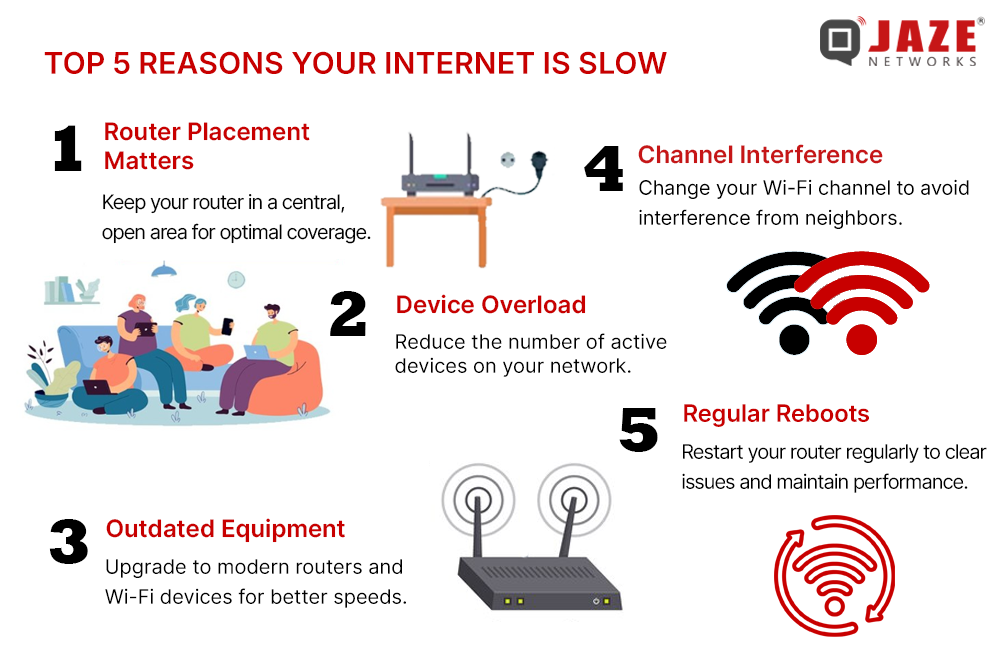
Your internet feels slow for many reasons, and most of them are not what people usually assume. It is not always your provider, and it is not always your device. In many cases, hidden issues inside your home network, router settings, or background apps are quietly reducing your speed without you noticing. Understanding these real causes can help you fix slow internet problems quickly and improve your browsing, streaming, and downloading experience.
Hidden Router Problems That Slow Down Internet Spee
Outdated Router Firmware
Many users never update their router firmware, which can lead to poor performance over time. Router manufacturers release updates to fix bugs, improve speed stability, and strengthen security. When firmware is outdated, your internet may feel slow even if your plan is fast. Updating it can significantly improve connection stability and reduce random lag or drops.
Poor Router Placement
Router location plays a major role in internet speed. If your router is placed inside a corner, behind walls, or near electronic devices, the signal weakens. This results in slower Wi-Fi, especially in other rooms. A central, open location helps distribute signals evenly and improves coverage throughout your home.
Overheating Router Hardware
Routers that run for long hours without cooling can overheat. When this happens, performance drops automatically to prevent damage. Overheating often leads to sudden slow speeds, buffering, or disconnections. Keeping your router in a ventilated space can help maintain stable internet performance.
Background Apps and Devices That Secretly Consume Bandwidth
Hidden Device Updates Running in Background
Many devices automatically download updates without notifying you. Phones, laptops, and smart TVs often use internet bandwidth for system updates in the background. This reduces available speed for browsing or streaming. Disabling automatic updates during peak usage can help maintain smoother internet performance.
Multiple Connected Devices at Once
When too many devices are connected to the same Wi-Fi network, bandwidth gets divided. Even if one device is actively in use, others may still consume data silently. This creates slow internet issues, especially in households with multiple users. Managing connected devices can improve overall speed.
Cloud Syncing Services Running Constantly
Apps like cloud storage services continuously upload and download data. This constant syncing consumes bandwidth without you noticing. When multiple apps sync at the same time, your internet speed drops significantly. Adjusting sync settings helps reduce unnecessary network load.
Network and ISP Issues That Most Users Ignore
ISP Throttling During Peak Hours
Internet Service Providers sometimes reduce speed during high traffic hours. This is called throttling and it affects streaming, downloads, and browsing speed. Many users think their internet is broken, but it is actually controlled bandwidth management by the ISP during peak usage times.
Weak Signal From Local Exchange Point
If you live far from the service provider’s main distribution point, your internet signal may weaken. This leads to inconsistent speed and higher latency. It is a physical limitation that many users do not realize affects performance, especially in rural or remote areas.
Faulty or Old Network Cables
Old or damaged cables can reduce internet quality significantly. Even if your router and plan are good, poor wiring can limit performance. Replacing outdated cables often results in noticeable speed improvements and more stable connections.
Advanced Settings and Hidden Network Restrictions
DNS Configuration Issues
Default DNS settings from ISPs are not always optimized for speed. Slow DNS response times can delay website loading and browsing performance. Changing DNS settings to faster alternatives can improve response time and reduce lag when accessing websites.
Router Security Limits and Filters
Some routers come with security filters or parental controls enabled by default. These settings can restrict bandwidth or slow down certain types of traffic. Disabling unnecessary filters can help restore full internet speed and improve overall performance.
Channel Interference in Wi-Fi Signals
Wi-Fi networks often overlap with nearby networks, especially in crowded areas. This causes interference and reduces signal quality. Changing your Wi-Fi channel can reduce congestion and improve speed, especially for wireless devices.
FAQs
1. Why is my internet slow even with high-speed plans?
Because internal network issues like router settings, device load, or interference can reduce actual speed.
2. Can too many devices slow down Wi-Fi?
Yes, multiple connected devices divide bandwidth and slow overall performance.
3. Does router location affect internet speed?
Yes, poor placement can weaken signal strength and reduce speed significantly.
4. What is ISP throttling?
It is when your internet provider reduces speed during peak usage hours.
5. How can I improve Wi-Fi speed quickly?
Restarting the router, reducing connected devices, and changing DNS settings can help immediately.
Conclusion
Slow internet is usually caused by hidden issues rather than one simple problem. From router placement and background apps to ISP limitations and network interference, many factors silently affect your speed. By understanding and fixing these issues, you can significantly improve your internet performance without upgrading your plan. Small adjustments often lead to big improvements, making your browsing faster, smoother, and more reliable.
